

What is a Domain Name & Why Websites Need It — Simple Guide
When you plan to hire a developer for your first business website, you will often hear a familiar suggestion: “Buy a domain name for your website.” Friends, teammates, and even developers repeat this advice. At first, it may sound like a simple instruction or just another requirement.
However, a domain is far more important than most people realise. Yes, it is the “name of your website” or your “website address,” but it also plays a major role in shaping your business image. Additionally, it influences credibility, branding, and your overall online presence. As a result, choosing the right domain can directly impact your business success.
By the end of this guide, you will understand what a domain is, how it works, and why it matters. More importantly, you will learn how to choose the perfect domain for your website—without getting confused by technical terms.
What is a Domain Name – Explained in a Simple, Practical Way
Think of a domain name as your business website’s address. It is the address of your online shop or office that anyone can find on the World Wide Web. This works just like a home address, but with a unique name that separates it from every other place.
For example, if a house is called “Brooks Villa” and it is the only one with that name in the town, people can easily find it. Similarly, a domain name is a unique address for your website in the huge “town” we call the Internet.
Example of a Domain Name
Our domain is skywebdevelopers.com. Just like a street address guides people to a physical business, this domain guides clients and visitors to our website—making it easy for them to find our services online.
Components of a Complete Domain Name
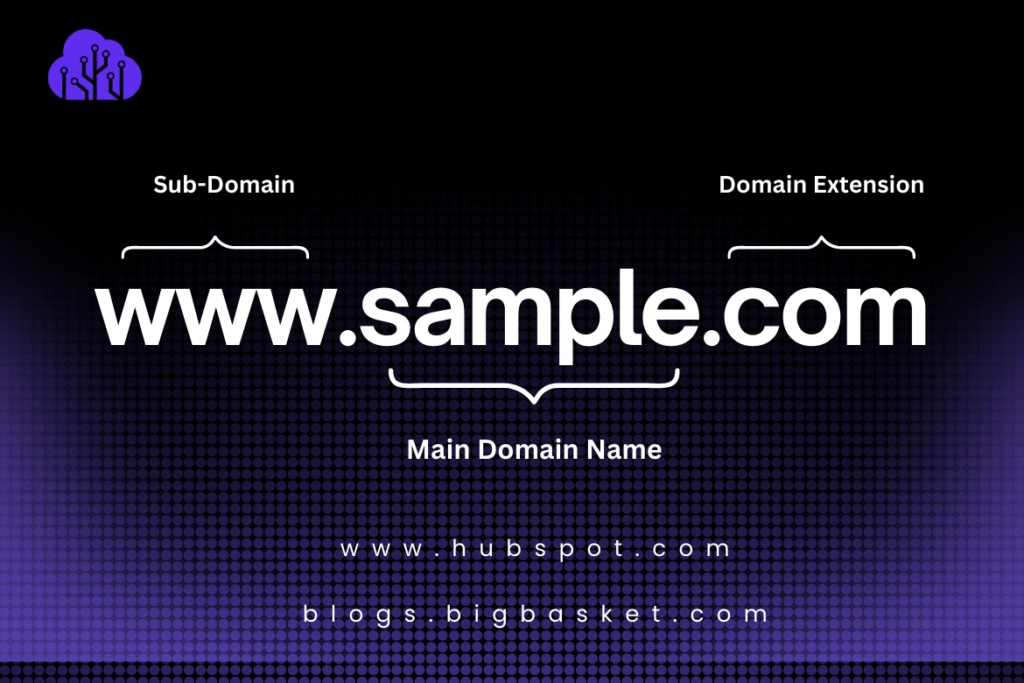
Let’s explain the above image:
- The Domain Name: This is the unique name of your website representing your brand identity. Examples include carmax, hubspot, skywebdevelopers. It reflects your business purpose, niche, and brand identity. It is also known as a second-level domain.
- The Domain Extension (TLD – Top-Level Domain): This is the part that comes after the domain name, such as .com, .net, .org, .edu, .co, .io, .info, etc.
Each extension usually shows the purpose of the website.
- .com for commercial/business
- .org for organisation
- .edu for an educational institute
It tells people—and even Google—what type of website you run. Whether it’s a commercial website, a charity foundation, an information-providing website, or an online shopping place.
.com is the most common and trusted extension for business and commercial websites.
- Sub Domain: This is the name placed before your main domain. You do not always need it. In fact, most small and medium websites do not use subdomains. However, large and complex websites often use them for specific sections.
Examples:
- help.hubspot.com
- knowledge.hubspot.com
- pll.harvard.edu
Subdomains help organise different departments of a website.
Why WWW is the Most Common Subdomain on the Internet
In the early days of the internet, websites used different subdomains for different jobs:
- www.domain.com for the website
- mail.domain.com for email
- ftp.domain.com for file downloads
So “www” was simply a label that told computers: “This is the web version of this domain.” That’s why almost every website uses www — it shows that this address is meant for the web. Today, technology is much more advanced, and one server can handle everything without needing “www.” But we still use it because it feels:
- familiar
- professional
- standard
- trustworthy
Why Most Websites Don’t Need a Specific Subdomain (and WWW is Enough)
- All pages can live under the main domain: Blog, FAQ, Services, Contact — all work perfectly as: www.yoursite.com/page-name
- No need for separate systems: Many websites don’t have different platforms like apps, portals, or dashboards.
- Easier for SEO: Google prefers a single main domain, not split into subdomains, because links and authority stay in one place.
- Cleaner and more professional URLs: www.yoursite.com/blog looks simpler than blog.yoursite.com
- Less technical setup: Subdomains require additional hosting settings, DNS records, and management — most businesses don’t need this complexity.
- Faster and cheaper to maintain: One domain equals one website, making updates, backups, and security.
- No confusion for visitors: Everything stays under one address, making your brand easier to remember.
Why a Domain Name Actually Exists (The Real Purpose)
Every website on the internet lives on a server (like a storage space where a website is placed). And every server has a long, complicated IP address, such as 172.67.145.92. This is the real location of your website on the internet — like the GPS coordinates of a building.
But here’s the problem:
- People can’t remember numbers
- People can’t type numbers every time
- Businesses can’t brand numbers
That’s where a domain name comes in.
What a Domain Name Really Does:
A domain name is basically a human-friendly shortcut that points to your website’s IP address. Your website server says: My address is 172.67.145.92. Your domain name says:
“Don’t worry. Just type skywebdevelopers.com in the browser, and I’ll take you to that location.”
It replaces the long numerical IP with an easy-to-remember name.
Why This Is a Fundamental Need for Every Website
- Humans cannot use IP addresses: Nobody will type: https://198.246.90.34. But everyone can type: hubspot.com
- Branding is impossible without a domain: Imagine telling customers, “Please visit my website — 198.246.90.34!” Impossible. A domain gives you a brand identity.
- Search engines depend on domain names: Google ranks domain names, not IP addresses.
- The Domain connects the user to the server, serving as a bridge between your visitor and your hosting server.
- Domains make the Internet usable for humans:
Without domains, the Internet would be a giant list of confusing numbers!
A domain exists because it converts your website’s complex IP address into a simple, memorable, human-friendly name—making it possible for people to find, visit, and trust your business online. Without domain names, the Internet would be nothing more than a long list of confusing numbers.
How to Buy a Domain Name – Step-by-Step Process
Buying a domain is simple once you know where to get it and the exact steps to follow. Think of it as reserving your business address online.
1. Choose a Trusted Registrar (Where to Buy)
A domain registrar is a company authorised to sell and register domain names. Popular, trusted registrars include:
- GoDaddy – Beginner-friendly, widely used
- Namecheap – Affordable, secure
- Google Domains – Simple, integrates well with Google services
- Hostinger – Trusted registrar, easy domain management
Always use a reputable registrar to avoid scams or losing control of your domain.
2. Search for Your Domain
- Use the registrar’s search tool to check availability
Example: Type bigbasket.com
- If it is available, then proceed to register
- If it is already taken, try alternatives (e.g., bigbucket.com, bigbasket.co), etc.
It’s better to keep it short, easy to spell, and brandable. Avoid hyphens or numbers.
3. Select Your Domain Extension
- Most common: .com (best for businesses)
- Other options: .net, .org, .co, .io, .pk
For global businesses, .com is typically the safest and most professional.
4. Register and Pay
- Click Add to Cart, select registration period (1 year minimum)
- Add privacy protection to hide personal information in the WHOIS database for a more detailed understanding. You can review this article: What is domain privacy
- Complete the payment — your domain is now officially yours.
5. Manage Your Domain
Once purchased, you can:
- Link it to your website hosting (if applicable; otherwise, leave it as is.
- Set up professional emails
- Enable security features
Keep your login credentials safe. Losing access means losing your domain.
Common Precautions While Buying a Domain
- Check registrar reputation – Avoid unknown or suspicious websites.
- Carefully consider renewal costs – Some cheap domains increase dramatically after the first year.
- Enable domain privacy – Protect your personal information from public WHOIS records (already described above).
- Avoid pre-owned or auction domains without research – Some may have a history of issues or penalties. To understand in more detail: Risks of ignoring domain name history.
- Buy the domain on your own email – Never register a domain using a web agency’s or someone else’s email. This ensures you retain full control of your domain.
- Keep credentials safe – Never share your registrar login; losing it can mean losing the domain.
How to Choose the Right Domain Name for Your Website
Choosing the right domain name is just as important as buying it. A good domain helps your business appear professional, makes it easier for visitors to remember, and even improves your future SEO. Here’s a complete guide to picking the perfect domain for your website.
1. Keep It Short and Simple
- A short domain is easier to type, remember, and share.
- Try to avoid long phrases or unnecessary words.
Examples:
Good: skyweb.com, hubspot.com
Avoid: hub-spot77.com, alphaballsinrunning23.com etc.
Think “easy for a kid to spell” — if it’s hard to type, visitors may leave.
2. Make It Brandable
- Your domain should reflect your brand identity and business purpose.
- Try to choose a unique and memorable name that can become your brand over time.
Brandable: skywebdevelopers.com, libertybooks.com
Generic: websitetech123.com, readingbooks245.com
Avoid copying other famous brands — it can cause confusion or legal issues.
3. Avoid Numbers, Hyphens, and Special Characters
- Numbers and hyphens make it harder to remember and type.
- Special characters (@, &, !) are not allowed in domain names.
Examples:
good: riverpoolsandspas
bad: riverpools&spas
Only letters (a–z) are safe; numbers or hyphens reduce credibility.
4. Use the Right Domain Extension (TLD)
- .com: Best for commercial/business websites.
- .org: Non-profits, foundations.
- .edu: Often used for educational institutes
- Country-specific ccTLDs such as.pk, .uk, .ca, .au, if you only target and target in the future, as well as the local audience.
For global businesses, .com is the safest. For local businesses, ccTLDs make your site appear trusted in that country.
5. Consider Keywords (Optional, but Helpful for SEO)
- Adding a relevant keyword can help people understand your business from a domain-specific perspective.
- Don’t overstuff keywords — keep it readable and natural.
Examples:
Good: brookshomehealthcare.com
Avoid: besthomehealthcareincalifornia.com
Use keywords only if it feels natural — branding is more important.
6. Check Availability on Social Media
- Ensure your domain name is available as a handle on Facebook, Instagram, Twitter, and LinkedIn.
- Consistency across the website and social media helps establish a strong brand.
Example:
Domain: hubspot.com
Social: TikTok, X, Meta, LinkedIn, Instagram: @hubspot
Avoid a domain that conflicts with an existing brand on social media.
7. Test It With Friends / Team
- Say it out loud and ask if it’s memorable, easily readable and pronounceable.
- Type it from memory and see if people can spell it correctly.
If you need to explain it twice, it’s probably too complex.
8. Make Sure It Passes the “Radio Test”
If someone hears your domain name once, they should be able to type it correctly without asking for confirmation.
Good: bluebox.com
Confusing: xpresskonnekt.com
9. Avoid Trademarked or Copyrighted Names
Never use domains similar to those of big brands.
Avoid:
amaz0nstore.com
uberpkrides.com
Such domains can be legally removed.
10. Prefer a .COM Domain (When Possible)
.com is globally recognised and trusted by customers. If unavailable, consider .co, .net, .io, or your country code.
Conclusion
A strong domain name builds your brand, boosts credibility, and improves SEO. Choose a simple, memorable, and professional domain from a trusted registrar to secure your website’s success and online presence.
Visit our website for upcoming articles. You can also refer to our FAQs for answers to your most frequently asked questions. And can also contact us for a free consultation.